

 May 14, 2026
  29 mins to read
 HESLB Login My Account: A Comprehensive Guide to OLAMS and Loan Applications The Higher Education Students’ Loans Board (HESLB) is a vital institution in Tanzania, offering financial aid to students pursuing higher education. Central to thi
HESLB Login My Account: A Comprehensive Guide to OLAMS and Loan Applications
The Higher Education Students’ Loans Board (HESLB) is a vital institution in Tanzania, offering financial aid to students pursuing higher education. Central to this process is the HESLB Login My Account, which provides access to the Online Loan Application and Management System (OLAMS). This comprehensive guide will walk you through everything you need to know about HESLB login, OLAMS login, and how to efficiently manage your HESLB account. Whether you're a new applicant or a returning user, this post will ensure you have the tools you need for a smooth experience.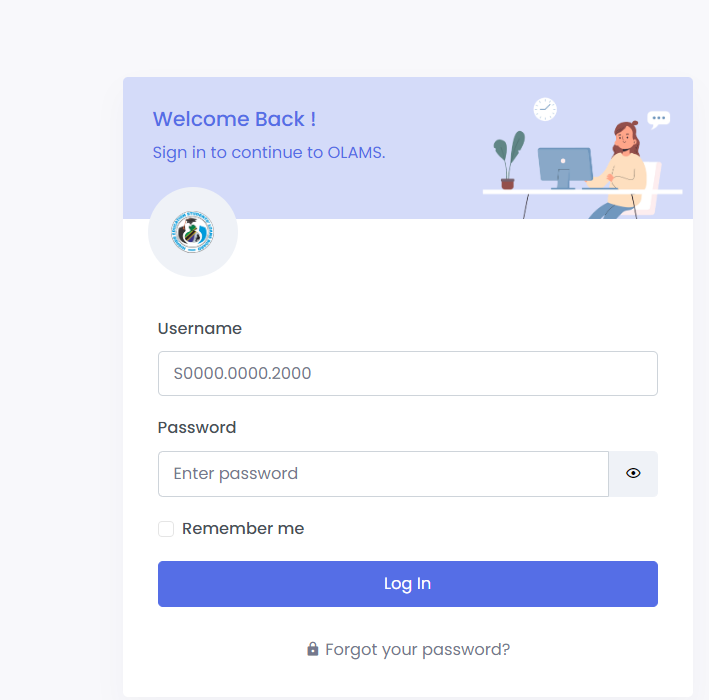
What is HESLB and OLAMS?
The Higher Education Students’ Loans Board (HESLB) is a government institution responsible for providing loans to Tanzanian students pursuing higher education. The loans are intended to cover tuition fees, accommodation, and other related expenses. OLAMS (Online Loan Application and Management System) is the digital platform through which students can apply for loans, manage their accounts, and track the progress of their applications.The HESLB login process is essential for any Tanzanian student seeking financial aid. Through the OLAMS login my account, students can manage their loan applications, track their loan status, and ensure they meet all the necessary requirements for receiving financial support. The HESLB login as a registered user offers various features that simplify the loan management process, making it an indispensable tool for students.Whether you are a new applicant or a continuing student, understanding how to navigate the OLAMS platform is essential. Below, we will walk you through the process of logging in, creating an account, and making the most of the features available on OLAMS.Key Features of OLAMS
OLAMS is designed to be a comprehensive portal where students can:- Submit Loan Applications: OLAMS provides a user-friendly interface for submitting loan applications, ensuring that students can apply for financial aid easily and efficiently.
- Track Application Status: Once the application is submitted, students can log in to OLAMS to check the status of their application and see any updates or requirements.
- Access Loan Statements: Through the OLAMS portal, students can view their loan statements, making it easier to keep track of disbursements and repayment schedules.
- Appeal Loan Decisions: If a student is dissatisfied with the loan amount awarded, they can use OLAMS to submit an appeal, providing the necessary documentation to support their case.
Step-by-Step Guide to HESLB OLAMS Login
Whether you are a new applicant or a returning user, logging into OLAMS is a straightforward process. Here’s how you can access your account:Step 1: Visit the HESLB OLAMS Login Page
Navigate to the official OLAMS login page using this URL: https://olas.heslb.go.tz/olams/account/login. This will take you directly to the login interface.Step 2: Enter Your Login Details
- Username: Your username is typically your student identification number (e.g., S0000.0000.2000).
- Password: Enter your password carefully in the provided field. Ensure that your caps lock is off, and double-check for any typos.
Step 3: Optional - Remember Me
If you’re logging in from a personal device, you can select the ‘Remember me’ option. This will save your login credentials for future visits, making the process quicker.Step 4: Click ‘Log In’
After entering your credentials, click the ‘Log In’ button. If your details are correct, you’ll be redirected to your OLAMS dashboard, where you can manage your loan application and account.Step 5: Troubleshooting Login Issues
If you encounter issues logging in, such as forgetting your password, OLAMS provides a ‘Forgot your password?’ link on the login page. Click this link to initiate the password recovery process. If you are a new user, select the ‘Signup now’ option to create an account.HESLB Loan Application Process
Applying for a student loan through OLAMS is a critical step for many students. Here’s a detailed overview of how to complete the loan application:Step 1: Access the Loan Application Form
After logging in to your OLAMS account, navigate to the loan application section at https://olas.heslb.go.tz/. Here, you’ll find the form that you need to fill out with accurate and complete information.Step 2: Complete the Application Form
The application form requires detailed information, including personal details, academic history, and financial status. Ensure that all sections are filled out correctly, as any mistakes could delay the processing of your application.Step 3: Pay the Application Fee
Before submitting your application, you must pay a non-refundable application fee of TZS 30,000.00. Payments can be made through various channels such as NMB, CRDB, TPB, Vodacom M-PESA, TIGO PESA, and AIRTEL MONEY.Step 4: Submit the Application
Once the form is completed and the fee is paid, you can submit your application through the OLAMS portal. After submission, you will receive a confirmation message, and your application status can be tracked through your OLAMS account.Step 5: Monitor Your Application Status
Regularly check your application status by logging into OLAMS. The platform will provide updates on your application’s progress, including any additional documentation required or the final decision on your loan.Managing Your HESLB Loan Account
Once your loan is approved and disbursed, it’s important to manage your account effectively. OLAMS offers several features to help you stay on top of your loan:- Loan Statements: View and download your loan statements to keep track of how much you’ve borrowed and the terms of repayment.
- Repayment Schedules: Access your repayment schedule to plan your finances accordingly.
- Appeals: If you believe the loan amount allocated is insufficient, you can file an appeal through OLAMS. The platform will guide you through the process of submitting additional documents to support your appeal.
OLAMS Features: A Closer Look
The OLAMS dashboard is packed with features designed to simplify the loan application and management process. Here’s a breakdown of what you’ll find:| Feature | Description |
|---|---|
| Loan Application | Start or continue your loan application process. |
| Application Status Tracking | Monitor the progress of your loan application in real-time. |
| Loan Statements | View detailed statements showing your loan disbursement and repayment history. |
| Repayment Schedule | Access your repayment schedule to stay on top of your financial obligations. |
| Appeal Submission | Submit an appeal if you’re not satisfied with your loan amount. |
| Password Recovery | Reset your password in case you forget it. |
| Account Management | Update personal details and manage your account settings. |
HESLB Loan Application Process: Navigating the OLAMS Portal
The HESLB loan application process is a critical step for students seeking financial aid. TheOLAMS login portal simplifies this process, allowing students to complete and submit their applications online. Here’s a closer look at how to navigate the HESLB login my account portal during the application process:Step 1: Complete the Application Form
Log into your HESLB login account and fill out the necessary details in the loan application form. Ensure that all information is accurate to avoid any delays in processing.Step 2: Pay the Application Fee
The application process requires a non-refundable fee of TZS 30,000. Payment can be made through several channels, including Vodacom M-PESA and TIGO PESA.Step 3: Submit Your Application via OLAMS Login
Once all the information is completed and the fee is paid, submit your application through your OLAMS login. You can then monitor your application status via your HESLB login my account.Table: Key Features of HESLB Login My Account
| Feature | Description |
|---|---|
| Loan Application | Submit and manage your application via the HESLB login portal. |
| Loan Status Tracking | Monitor your loan's progress through your OLAMS login my account. |
| Loan Statements | View and download statements via HESLB login my account. |
| Appeals | Use the appeals feature in OLAMS login if you're unsatisfied with your loan. |