

 May 14, 2026
  18 mins to read
 Learn how to use HESLB login for loans, appeals, and more on OLAMS. Simple steps for students and employers.
Understanding HESLB and Mastering Your HESLB Login
If you’re a student in Tanzania pursuing higher education, chances are you’ve come across the Higher Education Students’ Loans Board, or HESLB. This government body is all about making education accessible by providing loans and scholarships to eligible students. Their mission? To empower Tanzanian youth with financial support so they can focus on their studies and build a brighter future. Through their Online Loan Application and Management System (OLAMS), HESLB offers a one-stop platform where students can apply for loans, check their heslb login my account status, appeal decisions, and even manage repayments. The content on their site is practical and user-focused, catering to loan applicants, beneficiaries, employers, and higher learning institutions alike.
In this post, we’ll break down everything you need to know about the heslb login process—whether you’re accessing sipa heslb login password features, managing your olams heslb login account login password, or checking your heslb allocation status login. Let’s get started with some straightforward advice and real examples to make your experience smooth.
What Is the HESLB Login Process?
The heslb login is your gateway to OLAMS, found at https://olas.heslb.go.tz/olams/account/login. Whether you’re a first-time applicant or a registered user, this portal is where the magic happens. For instance, if you’re checking your heslb login continuous updates or appealing a decision via heslb appeal login, it all starts here.
To log in:
- Visit the OLAMS login page.
- Enter your Username (e.g., S0000.0000.2000—your Form 4 Index Number).
- Type your Password in the provided field.
- Check “Remember me” if you’re on a personal device, then hit Log In.
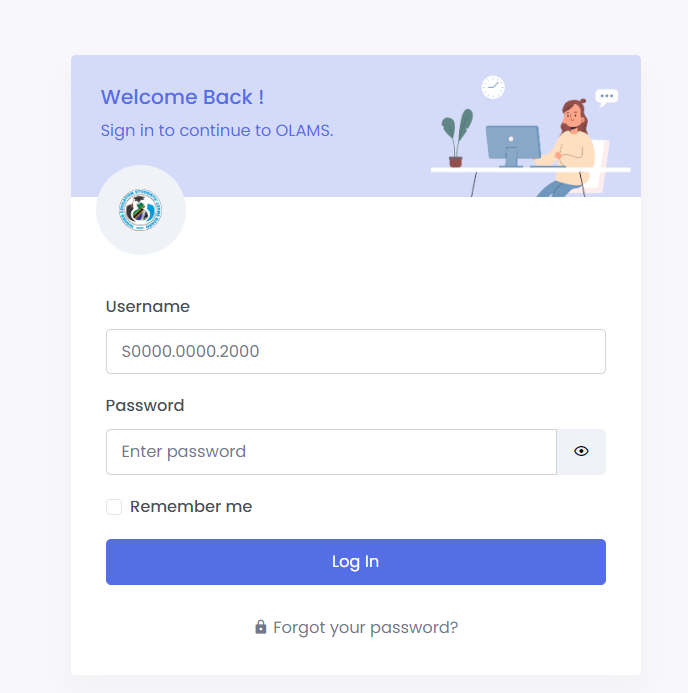
Forgot your password? No stress. Click “Forgot your password?” and reset it using your Index Number on the sipa heslb login as registered user reset page. New users can sign up at https://olas.heslb.go.tz/olams/account/signup by selecting their sign-up type and agreeing to HESLB’s terms.
Managing Your HESLB Login My Account
Once you’re in, the heslb login my account section is where you’ll spend most of your time. Loan applicants can use the sipa heslb login to apply for loans or scholarships, while beneficiaries can access olams heslb login to make payments or get loan statements. For example, Jane, a second-year student, logs into her heslb login account weekly to track her disbursement status—it’s that simple.
Here’s what you can do:
- Apply for a Loan: Head to https://olas.heslb.go.tz/olams/application-v2/pre-registration.
- Check Allocation Status: Use your heslb login my account login to see if funds are on the way.
- Appeal Decisions: Click “Click to Appeal” after logging into heslb olams login.
Pro tip: Keep your sipa heslb login account credentials safe. Over 200,000 students used OLAMS in 2024 alone, and secure logins prevent mix-ups.
Troubleshooting Common HESLB Login Issues
Sometimes, the didis heslb login or olams heslb login account process hits a snag. Maybe you’ve forgotten your sipa heslb login password, or the system isn’t recognizing your heslb login as registered user details. Here’s how to fix it:
- Password Problems: Go to https://olas.heslb.go.tz/olams/account/reset-password, enter your Index Number, and reset your heslb login my account login password olams.
- Account Locked: Contact HESLB support if you’ve tried too many times.
- Browser Issues: Clear your cache or switch browsers—OLAMS works best on Chrome or Firefox.
Take John’s case: he couldn’t access his sipa login heslb because of a typo in his username. A quick reset sorted it out in minutes.
Who Else Uses HESLB Login?
The heslb login isn’t just for students. Employers and loan officers have their own portals:
- Employers: Log in at https://olas.heslb.go.tz/olams/account/employer-login to manage repayments for employees.
- Loan Officers: Higher Learning Institutions (HLIs) use olams heslb login account to verify student details.
For example, an employer in Dar es Salaam uses sipa login heslb login to deduct loan repayments directly from salaries—streamlined and efficient.
Tips for a Seamless HESLB Login Experience
Want to ace your heslb login continuous tasks? Here’s some actionable advice:
- Bookmark the Site: Save https://olas.heslb.go.tz/ for quick access.
- Update Passwords Regularly: Change your sipa heslb login as registered user password every few months.
- Check Announcements: The homepage often lists deadlines—like the 2024 loan application window closing in September.
With over 80% of Tanzanian students relying on HESLB loans (per 2023 stats), staying on top of your heslb login account keeps you ahead.
Final Thoughts on HESLB Login
The heslb login process ties directly into HESLB’s mission of empowering students. Whether you’re applying via sipa heslb login account, appealing with heslb appeal login, or managing repayments through olams heslb login, OLAMS makes it all possible. It’s a tool designed to save time and reduce hassle—just keep your credentials handy and check in regularly.
Got questions about your heslb allocation status login or need help with sipa heslb login? Drop a comment below or visit the OLAMS site for support. Your future starts with a simple login—make it count!